Geef je zakelijke telefoongesprekken een nieuwe impuls met Voxbi – Een cloudtelefoonsysteem dat speciaal voor jou is ontwikkeld
Waarom voor Voxbi kiezen?
Voxbi is ons cloudgebaseerde telefoonsysteem (Cloud PBX) ontworpen om zakelijke communicatie eenvoudiger en professioneler te maken. Of je nu een klein team bent of een volwassen bedrijf, Voxbi biedt je alle tools die je nodig hebt in één eenvoudige oplossing. Kies het abonnement dat bij je bedrijf past en begin slimmer te communiceren, zonder ingewikkelde procedures of hoge kosten
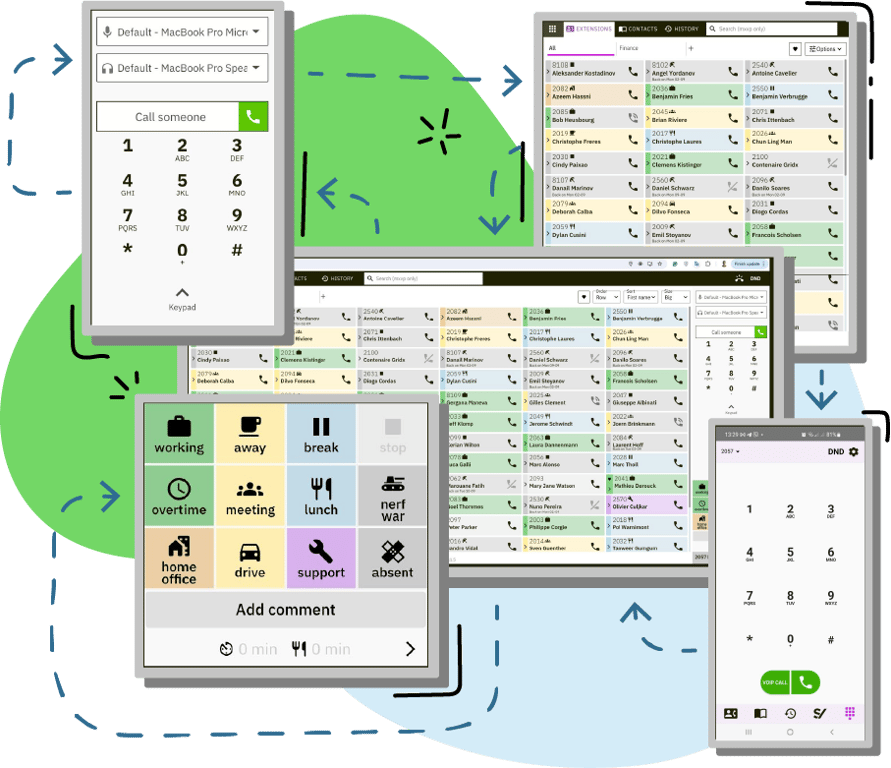
Uitgebreid scala aan functies
Het Voxbi cloudPBX-platform biedt een uitgebreid scala aan functies ontworpen om de communicatie en productiviteit te verbeteren. Deze functies omvatten geavanceerde gespreksroutering, gedetailleerde analyse- en rapportagetools, integratie met CRM-systemen, de mogelijkheid om voicemailberichten naar e-mail door te sturen en ondersteuning voor mobiele apps.
Easy integratie met je favoriete tools
Voxbi cloud PBX biedt talrijke integratiemogelijkheden, waardoor andere systemen kunnen worden gekoppeld aan Voxbi. Hierdoor kunnen bedrijven hun communicatie-infrastructuur verbeteren door hun samenwerkingsinstrumenten integreren en diverse bedrijfsapplicaties rechtstreeks bij Voxbi.


Flexibele pakketten voor elk bedrijf
Het aanbod van Voxbi UCaaS verschillende pakketten, zodat u de beste prijs-kwaliteitverhouding krijgt voor uw specifieke behoeften. Deze pakketten zijn afgestemd op bedrijven van verschillende omvang en communicatiebehoeften, en bieden flexibiliteit en kostenefficiëntie.
Ontdek de belangrijkste functies van Voxbi
Galerijweergave
Multicast oproepen
Verzend gesproken berichten en visuele waarschuwingen naar IP-telefoons, luidsprekers en lampen – ideaal voor directe mededelingen en noodmeldingen.
Slimme gespreksroutering
Leid gesprekken door op basis van groep, locatie, taal of gebruikerstags (die vaardigheden aangeven). Maak gebruik van een flexibele statusengine (In vergadering, Afwezig, Aan het werk, Bezet) om gesprekken efficiënt door te verbinden. Combineer deze criteria voor eenvoudig te onderhouden, geoptimaliseerde gespreksstromen.
Veilige gegevensoverdracht
Beveilig uw communicatie met geavanceerde versleuteling door HTTPS voor webverkeer en SIP TLS voor zowel SIP-apparaten als WebRTC te ondersteunen, zodat uw gegevens via alle kanalen veilig blijven.
Oproep overnemen
Met de functie voor het overnemen van gesprekken kunt u eenvoudig elke telefoon beantwoorden die binnen uw groep overgaat.
Tijdgebaseerde routering
Automatische doorschakeling van oproepen op basis van het tijdstip van de dag, de dag van de week of specifieke roosters. Deze functie is vooral handig bij het afhandelen van sluitingstijden van kantoren, zodat oproepen zowel tijdens als na kantooruren op de juiste manier worden doorgeschakeld.
Mobiel Twinning
Synchroniseer oproepen met mobiele apparaten, zodat medewerkers overal flexibel oproepen kunnen ontvangen en beheren.
Bescherming tegen fraude
Beveilig uw bedrijf met onze bescherming tegen frauduleuze telefoongesprekken. Ons systeem houdt in realtime het belgedrag in de gaten om ongeoorloofde telefoongesprekken op te sporen en te voorkomen, en biedt financiële dekking voor eventuele frauduleuze telefoongesprekken.
Beheer van tijdverschuivingen
Stel moeiteloos werkroosters op en wijs diensten toe. Krijg een overzicht per medewerker om te zorgen voor optimale bezetting en productiviteit.
Prioriteit van oproepen
Zorg ervoor dat belangrijke bellers onmiddellijk worden geholpen met onze VIP-prioriteitsfunctie. Verplaats gesprekken van aangewezen VIP’s automatisch naar de kop van de wachtrij, zodat ze voorrang krijgen en als eerste worden afgehandeld.
Ontdek alle functies van Voxbi op het gebied van gespreksroutering, mobiliteit, analyse en productiviteit.
Een goed gesprek begint met het juiste hulpmiddel
- Telefoonstatus: Bekijk of iemand beschikbaar is, in gesprek is of de ‘Niet storen’-modus heeft ingeschakeld. Je kunt rechtstreeks vanuit het dashboard een gesprek starten.
- Aanwezigheidsstatus: Laat je collega’s met één klik weten of je aan je bureau zit, in een vergadering zit of afwezig bent.
- Slimme gespreksroutering: Inkomende gesprekken worden, op basis van de realtime status van uw gebruikers, doorgeschakeld en toegewezen aan de medewerker die het meest geschikt en beschikbaar is om het gesprek aan te nemen.
Een volledig geïntegreerd systeem
Galerijweergave

Verbeter het personeelsbeheer met functies voor tijdregistratie, verlofbeheer, toegangscontrole via pasjes, het bijhouden van verblijfslanden en efficiënte dienstroosterplanning.

Automatiseer uw salarisverwerking door aanwezigheidsgegevens, inclusief overuren, door te sturen naar salary.lu. Zorg ervoor dat de salarisberekeningen voor uw team op tijd worden uitgevoerd.

Verbeter uw Odoo-ervaring met geïntegreerde telefonie, geautomatiseerde gespreksregistratie, door AI aangestuurde emotieanalyse en realtime klantgegevens.

Verbeter de communicatie binnen uw organisatie dankzij de integratie met Microsoft Teams, dat één platform biedt voor chat, video en samenwerking.

Ontdek alle tools die met Voxbi kunnen worden geïntegreerd: cloud PBX.
De Voxbi-pakketten
We begrijpen dat ieders behoeften uniek zijn. Daarom hebben we vier veelzijdige pakketten samengesteld, die stuk voor stuk boordevol functies zitten om aan een breed scala aan behoeften te voldoen. Of je nu op zoek bent naar basisvoorzieningen of geavanceerde AI-functies, onze pakketten zijn zo ontworpen dat ze je precies bieden wat je nodig hebt. Bekijk elke optie in detail en kies degene die het beste bij jouw doelstellingen past. Wij helpen u graag bij het vinden van de oplossing die perfect aansluit bij uw behoeften.

Tabel (1)

Vraag
Antwoord
Ja, dat hebben we zeker! De documentatie is te vinden op docs.voxbi.com.
Voxbi is beschikbaar voor Windows en mobiele apparaten (Play Store voor Android en App Store voor iOS).
Gebruikers van Mac en Linux kunnen de webapplicatie gebruiken die beschikbaar is op https://voxbi.team/.
Je kunt de nieuwste versie van Voxbi voor Windows download en via onze paginadownload .
Gebruikers van Mac en Linux kunnen de webapplicatie gebruiken die beschikbaar is op https://voxbi.team/.
Je kunt de nieuwste versie van Voxbi voor Windows download en via onze paginadownload .
Wanneer er een oproep binnenkomt voor je groep, gaat je doorkiesnummer over, waarna de oproep wordt doorgeschakeld naar je mobiele telefoon. Als voicemail op je mobiele telefoon is ingeschakeld, kan de oproep door je voicemail worden opgevangen als deze eerder reageert dan jij. Aangezien het systeem geen onderscheid kan maken tussen iemand die opneemt en de voicemail die de oproep opvangt, wordt de oproep op dezelfde manier behandeld.
Om dit te voorkomen, kunt u de voicemail op uw mobiele telefoon volledig uitschakelen of de voicemailvertraging verlengen tot deze langer is dan de belduur van de groep. De beste oplossing is om de voicemail op uw mobiele telefoon volledig uit te schakelen.
Om dit te voorkomen, kunt u de voicemail op uw mobiele telefoon volledig uitschakelen of de voicemailvertraging verlengen tot deze langer is dan de belduur van de groep. De beste oplossing is om de voicemail op uw mobiele telefoon volledig uit te schakelen.
Volg onze stapsgewijze handleiding om je configuratie te migreren. Heb je haast? Hier is een samenvatting:
1) Werk Voxbi Legacy bij naar de nieuwste versie die in de store beschikbaar is;
2) Open de nieuwste versie van Voxbi Legacy minstens één keer;
3) Installeer en open pas daarna Voxbi 2.
1) Werk Voxbi Legacy bij naar de nieuwste versie die in de store beschikbaar is;
2) Open de nieuwste versie van Voxbi Legacy minstens één keer;
3) Installeer en open pas daarna Voxbi 2.
Als je vraag hier niet wordt beantwoord, kun je onze database met veelgestelde vragen over alle Voxbi- Cloud PBX s raadplegen.