Security Groups
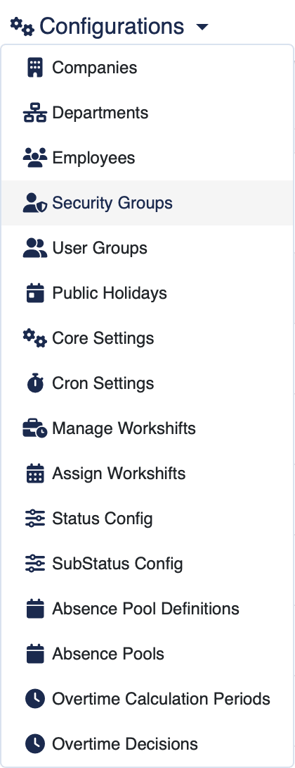
Security Groups are created and managed in a submenu of the Configurations menu.
Along with the groups's name, an permissions, there are 3 additional options:
1 Users
The members of the security group.
2 Groups
The standard users groups (not-security groups) that will be managed by this security groups.
3 Flags
Two additional validation options:
- Allow own Validation, which allows the members of this group to validate their own requests; and
- Single Validation,
4 Permissions
The main function of a Security Groups is to give permissions to its users to perform relevant Tempus actions. We are currently revising the permissions names to make them more understandable. The tables bellow list the current and revised names along with a description of the permission.
Important
The visible permissions depend on the currently active modules. If you don't see in your system one the permissions bellow is because the corresponding module is not active in your Tempus configuration.
4.1 Core
Legacy Name | New Name | Description |
System Settings | Manage System Settings | Access and change Tempus system settings. Not required for HR tasks. |
Security Groups | Manage Security Groups | Create, delete and edit security groups to add and remove users and permissions. |
User Groups | Manage User Groups | Create, delete and edit standard user groups for internal organization. Standard user groups don't have permissions. |
Edit Users | Manage Users | Create, edit and disable users. |
Edit Contract end date | Manage Employees Contracts | Edit employees contracts; assign and modify start and end dates. |
Edit Companies | Manage Companies | Create and edit Companies; add employees to them. |
Delete Users | Remove Employees | This permission is for correcting mistakes. An employee who leaves the company should be disabled, not removed. |
Delete Companies | Remove Companies | This permission is for correcting mistakes. A company that has become inactive should be disabled, not removed. |
Ignore IP Restriction | Ignore Network Access Restrictions | Access this interface from non-authorized networks. Tempus can use IP ranges to block access from non-authorized networks. |
Edit Department | Edit Departments | Create, edit and remove departments. |
Delete Department | Delete Department | User can delete departments. |
Edit Meta Data | Manage Metadata | User can edit and add metadata. |
Edit Terminals | Manage NFC Tablets | Add, edit and remove tablets running Tempus NFC applications for badging. |
Edit Badges | Manage NFC Badges | Add, edit and remove NFC badges to and from employees. NFC badges allow quick authentication in tablets running Tempus NFC application. |
Allow Webhooks access | Allow Own Web-hooks | Create, edit and use web-hooks for their own use. |
Edit Other users Webhooks | Manage Web-hooks | Create, edit and remove webHooks for all employees. |
Allow Api access | Allow API access | User can access the API. |
Allow all groups | Allow all groups | User can see all users in the groups. |
Show inactive users | Show Inactive Employees | Access no longer active employees accounts and information. |
4.2 Timelogger
Legacy Name | New Name | Description |
Deny access to the Time logger | This group can't use the Time logger | |
Manage Public Holidays | Manage Public Holidays | |
Edit Status Settings | Edit Timelogger Status and Layout Settings | |
Edit Status of users | Edit the Status of a user | |
Edit SubStatus Settings | Edit Timelogger SubStatus and Layout Settings | |
Edit Workshifts | This user can edit the workshifts | |
Assign Workshifts | This user can assign workshifts to the assigned groups | |
Reset User Workshifts (Force Recalculation) | Grant users the ability to perform a hard reset on other users workshifts, triggering a complete recalculation of their compiled data. | |
Request Correction for other Users | This user can request corrections for users in the assigned groups | |
Validate Corrections | This user can accept or deny corrections for users in the assigned groups | |
No Correction validation | The user can do corrections without validations | |
Show the GPS | This user can see the GPS coordinates of other users |
4.3 Report
Legacy Name | New Name | Description |
Show Reports | Allow the user to see the reports | |
Edit Report Templates | Allow the user to edit the report templates | |
Hide own Report | Hide the report for the user itself | |
Show status count report | Grants user access to status count report | |
Show detailed status report | Grants user access to detailed status report |
4.4 Absence
Legacy Name | New Name | Description |
Show absence requests | Gives access to other absence requests | |
Edit absence requests | Allows to modify users absence requests | |
Validate absence requests/removals [Level 1] | Allows to validate users absence requests and removals [Level 1] | |
Validate absence requests/removals [Level 2] | Allows to validate users absence requests and removals [Level 2] | |
Validate absence requests/removals [Level 3] | Allows to validate users absence requests and removals [Level 3] | |
🔕 Silence Notifications | Disables all feature that sends out notifications | |
Show absences | Gives access to users absences | |
Add absences | Allows to add absences | |
Edit absences | Allows to modify users absences | |
No absence validation required | This permission allows to remove own absences without removal validation | |
Show users calendar | Allows to show users calendar | |
Shows absences sub types badges in calendar | Shows absences sub types as badges in calendar | |
Deny calendar | Denies access to calendar | |
Show the full calendar overview | Allows to show the full calendar overview (included Illness data) | |
Deny calendar overview | Denies access to calendar overview | |
Configure pool definitions | This permission allows to configure the absence pool definitions | |
Configure users pools | This permission allows to add absence pools to users | |
Access rolled over calculations | This permission allows to access and apply rolled over calculations to users |
4.5 Home Office
Legacy Name | New Name | Description |
Validate Home Office Requests/Removals | Allows validating users' home office requests and removals | |
View Other Users' Home Office Calendar | Grants access to view other users' home office calendar days | |
Add Home Office Days for Other Users | Allows adding home office calendar days for other users | |
Edit Other Users' Home Office Calendar Days | Allows modifying other users' home office calendar days | |
No home office validation required | This permission grants the ability to add or remove a home office setup without the requirement of validation. | |
Show the full home office overview | Allows to show the full home office overview | |
Deny Home Office Calendar | Denies access to calendar home office | |
Deny Home Office Overview | Denies access to calendar home office overview | |
Show Home Office Report | Grants user access to global report on home office activities |
4.6 Overtime Calculation Period
Legacy Name | New Name | Description |
Manage overtime calculation periods | Add edit and remove overtime calculation periods |
4.7 Schedule
Legacy Name | New Name | Description |
Add Schedules | The user can add Schedules | |
Edit Schedules | The user can edit Schedules | |
Delete Schedules | The user can delete Schedules | |
Display Schedules | The user can display Schedules | |
Edit Schedules Slots | The user can edit and add Schedules Slots | |
Assign Schedules Slots | The user can assign Schedules Slots | |
Delete Schedules Slots | The user can delete Schedules Slots | |
Edit Schedules Entries | The user can edit and add Schedules Entries | |
Delete Schedules Entries | The user can delete Schedules Entries | |
Validate Entries changes | The user can accept or refuse Schedules Entries changes | |
Validate Slot requests | The user can accept or refuse Schedules slot requests | |
Send week schedule | The user can send the week schedule by mail/chat |
4.8 Notify
Legacy Name | New Name | Description |
Access Announcements | Access the Announcement interface and send push notifications to users groups |
4.9 MIXPbx
Legacy Name | New Name | Description |
Show Number | View ongoing calls’ phone numbers |
4.10 Auto Status
Legacy Name | New Name | Description |
Edit AutoStatus Settings | Create, edit and remove auto-status and assign them to employees |
4.11 Salary.lu
Legacy Name | New Name | Description |
Send salary.lu reports | Allow the user to send the reports to salary.lu |
4.12 Microsoft Graph API
Legacy Name | New Name | Description |
Access Ms Graph API health | Manage the integration with Microsoft Graph API |