Transform your business calls with Voxbi – A cloud phone system built for you
Why choose Voxbi?
Voxbi is our cloud-based phone system (Cloud PBX) designed to make business communication easier and more professional. Whether you’re a small team or a grown company, Voxbi gives you all the tools you need in one simple solution. Choose the plan that fits your business and start communicating smarter, without the complexity or high costs
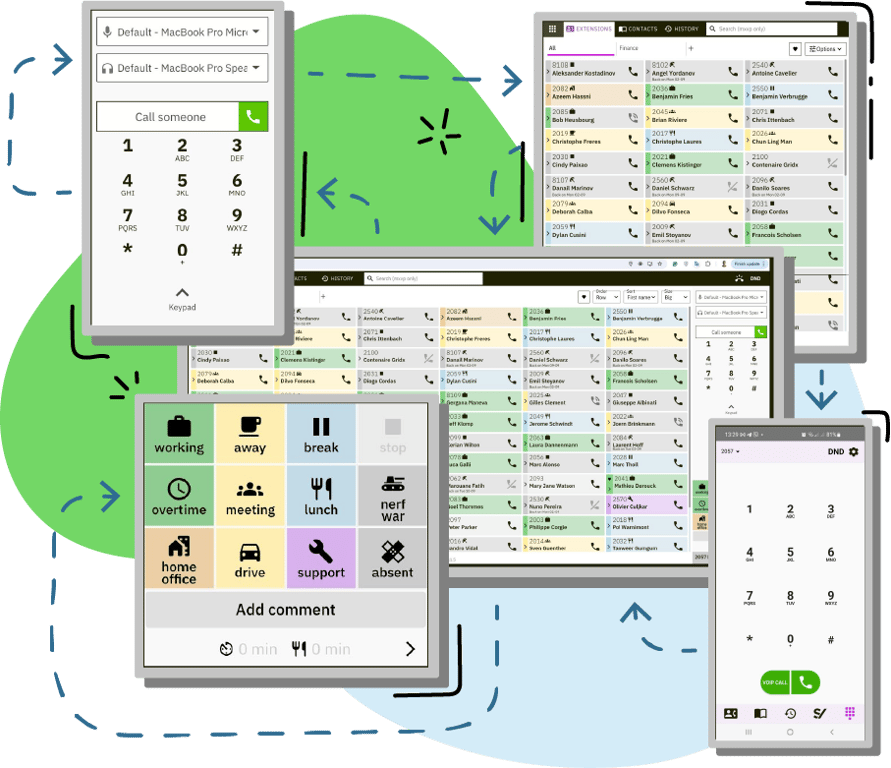
Extensive range of features
The Voxbi cloudPBX platform offers an extensive range of features designed to enhance communication and productivity. These features include advanced call routing, detailed analytics and reporting tools, integration with CRM systems, voicemail-to-email functionality, and mobile app support.
Easy integration to your favorite tools
Voxbi cloud PBX offers many integration capabilities, allowing other systems to connect with Voxbi. This enables businesses to enhance their communication infrastructure by integrating their collaboration tools and various business applications directly with Voxbi.


Flexible packages for every business
Voxbi UCaaS offers different packages, ensuring you get the best value for your specific requirements. These packages are designed to accommodate various business sizes and communication demands, providing flexibility and cost-effectiveness.
Discover Voxbi's main features
Gallery view
Multicast paging
Broadcast voice messages and visual alerts to IP phones, speakers, and lights - ideal for instant announcements and emergency notifications.
Smart call routing
Route calls by group, location, language, or user tags (representing skills). Utilize a flexible status engine (Meeting, Absent, Working, Busy) to direct calls efficiently. Combine these criteria for easy-to-maintain, optimized call flows.
Secure data transmission
Protect your communications with state-of-the-art encryption by supporting HTTPS for web traffic, and SIP TLS for both SIP devices and WebRTC, ensuring your data remains secure across all channels.
Call pickup
Easily answer any ringing phone within your group with the call pickup feature.
Time based routing
Automatic route calls based on time of day, day of the week, or specific schedules. This feature is especially useful for handling office closing times, ensuring calls are directed appropriately during and after business hours.
Mobile Twinning
Sync calls to mobile devices, enabling personnel to receive and manage calls flexibly from anywhere.
Anti-fraud protection
Secure your business with our anti-fraud call protection. Our system monitors call patterns in real-time to detect and prevent unauthorized calls, providing financial coverage for any fraudulent call activities.
Time shift management
Define work schedules and assign shifts effortlessly. Get an overview for each employee to ensure optimal coverage and productivity.
Call priority
Make sure important callers get immediate attention with our VIP call priority feature. Automatically move calls from designated VIPs to the top of the queue, ensuring they are prioritized and handled first.
Discover all Voxbi features about call routing, mobility, analytics, and productivity.
Great conversation starts with the right tool
- Phone status: See if a person is available, on a call, or on DND. You can launch a call directly from the dashboard.
- Presence status: In a click, let your colleagues know if you are at your desk, in a meeting, or away.
- Smart call routing: Incoming calls are redirected and dispatched according to the real-time status of your users, to the most qualified and available to take the call.
A fully integrated system
Gallery view

Enhance workforce management with features for time attendance, holiday management, badge access, country tracking, and efficient shift scheduling.

Automate your payroll processing by transferring time attendance data, including extra hours, to salary.lu. Ensure timely salary calculations for your team.

Enhance your Odoo experience with integrated telephony, automated call logging, AI-powered emotional analysis, and real-time customer data.

Enhance your organization's communication with Microsoft Teams integration, offering a unified platform for chat, video, and collaboration.

Explore all the tools that can be integrated with Voxbi cloud PBX.
The Voxbi packages
We understand that everyone’s needs are unique. That’s why we’ve created four versatile packages, each packed with features to cater to a wide range of requirements. Whether you're looking for basic essentials or advanced AI features, our packages are designed to provide you with exactly what you need. Explore each option in detail and choose the one that best suits your goals. Let us help you find the perfect fit for your needs.

Table (1)

Question
Answer
Yes, we do! Documentation is available at docs.voxbi.com.
Voxbi is available on Windows and mobile (Play Store for Android and App Store for iOS).
Mac and Linux users can use the web application available at https://voxbi.team/.
You can download the latest version of Voxbi for Windows from our download page.
Mac and Linux users can use the web application available at https://voxbi.team/.
You can download the latest version of Voxbi for Windows from our download page.
When a call comes into your group, it rings your extension, which is then forwarded to your mobile. If your mobile has voicemail enabled, the call can be intercepted by your voicemail if it picks up before you do. Since the system can’t distinguish between a person answering and the voicemail picking up, the call is treated the same way.
To prevent this, you can either disable your mobile voicemail completely or extend the voicemail delay to be longer than the group’s ring time. The best solution is to completely disable your mobile voicemail.
To prevent this, you can either disable your mobile voicemail completely or extend the voicemail delay to be longer than the group’s ring time. The best solution is to completely disable your mobile voicemail.
To migrate your configuration, follow our step by step guide. In a rush? Here’s a summary:
1) update Voxbi Legacy to the latest available in the store;
2) open the latest version of Voxbi Legacy at least once;
3) only then install and open Voxbi 2.
1) update Voxbi Legacy to the latest available in the store;
2) open the latest version of Voxbi Legacy at least once;
3) only then install and open Voxbi 2.
If your question isn't answered here, please browse our database of all Voxbi Cloud PBX FAQs.